

Purpose
Progress notes provide a factual record of the support delivered to a participant. They help demonstrate progress towards goals, support continuity of care, and meet NDIS and organisational compliance requirements.
Completing Progress Notes
All shifts require progress notes, completed as soon as possible after each shift and submitted by the end of the day. Progress notes are part of the participant’s official record and are essential for showing support provided, tracking progress, ensuring continuity of care, and meeting NDIS compliance.
When Should I Complete My Notes?
All progress notes should be completed immediately after each support. Avoid completing notes until the next day or accumulate them across multiple shifts. Where possible, choose one of the following options:
Complete notes directly after support. If you have another shift after, ensure all notes are completed by end of day.
Use the last 5–10 minutes of your support to finalise notes. Inform the participant/family first, as not all may agree to you completing notes while on support.
What Information Should Be Included?
Progress notes should include only relevant information about the support provided and anything another worker may need to know. Examples include:
Activities completed
Participant engagement and response
Progress towards goals
Health, wellbeing and safety observations
Behavioural or emotional regulation observations
Risks identified during the shift
Changes in support needs
Significant events that may impact future supports
General Rules
DO ✔
Be objective and factual
Describe what happened
Record support provided
Link activities to participant goals where possible
Include relevant health, wellbeing and safety information
Use professional language
Be specific
DO NOT ✘
Write opinions or assumptions
Use judgemental language
Copy and paste previous shift notes
Use vague statements such as "Had a good day"
Include personal opinions about participants, families or staff
Avoid including personal opinions, assumptions or information that is not relevant to the participant's support.
Using ShiftCare
Clocking In and Out, Writing Progress Notes, and Recording Kilometres
STEP 1
Open your shift
From your roster, select the allocated shift. Review:
Participant name
Date and shift time
Support location
Any shift-related forms
Mileage requirements
When arriving for support, select Clock In.

STEP 2
Navigate To Progress Notes
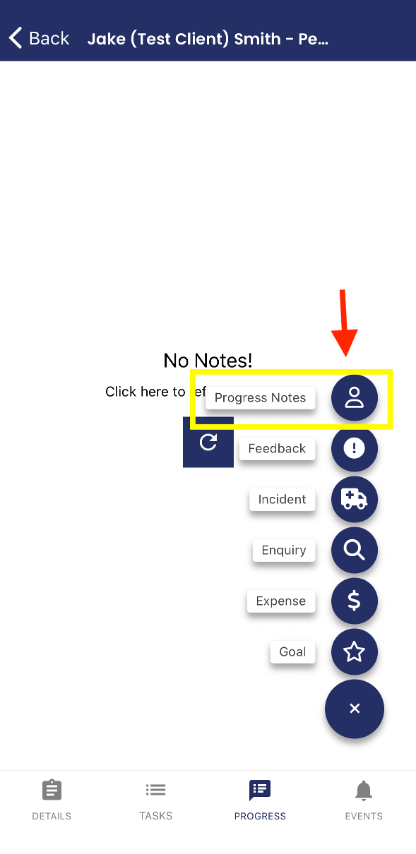
Select the Progress tab located at the bottom of the screen. If no notes exist, you will see the "No Notes" screen.
Select the + button in the bottom right corner.

STEP 3
Create A Progress Note
Select Progress Notes.
Only use:
Progress notes to record what occurred during the shift and the support provided.
STEP 4
Complete The Progress Note
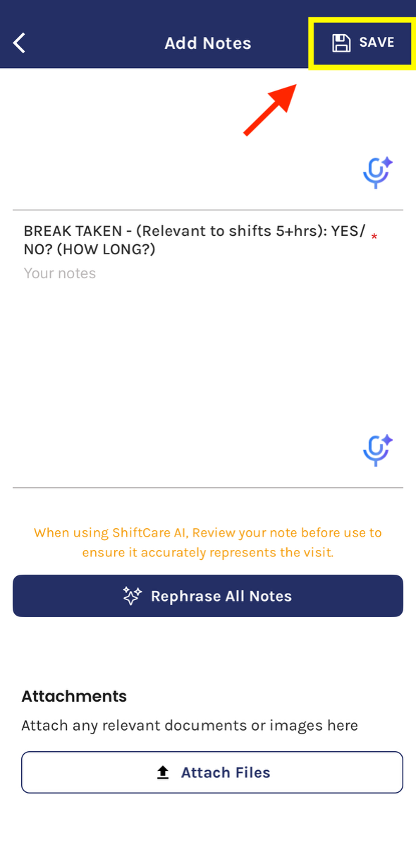
Complete every section before saving. For a detailed guide on what to include in your progress notes, please refer to the section "A Step-by-Step Guide to Completing Each Section of the Progress Notes" below, after Step 6.

STEP 5
Review And Save
Before selecting SAVE:
Check spelling and grammar
Ensure notes are factual and objective
Confirm all sections have been completed
Confirm incidents have been separately reported if required
Select SAVE in the top right corner.
STEP 6
Recording Mileage
If transport occurred during the shift, return to the shift details screen where you first clocked in, scroll down and select Mileage.
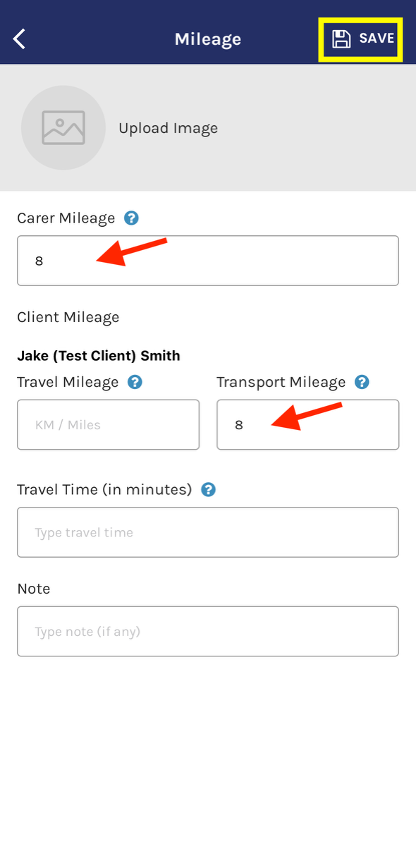
Enter the total kilometres travelled by the support worker during the support shift. This amount must be entered in both the Carer Mileage and Transport Mileage fields, as shown in the example below. Please leave all other fields blank.
Provide a brief description
Good Example - Transported participant from home to local shopping centre in Kincumber and return. OR Suburb to suburb – Drive around Wollongong to Warrawong shopping centre and return home.
Avoid - Drove around. Travel. N/A.
Select SAVE.
SHIFTCARE
A Step-by-Step Guide to Completing Each Section of the Progress Notes
SHIFT TIME
Record the rostered shift duration. Good example - 6 hours | Avoid - All day
START TIME
Record the actual time support commenced. Good example - 9:00am | Avoid - Morning
FINISH TIME
Record the actual finish time. Good Example - 3:00pm | Avoid - Afternoon
OBJECTIVE
Good Example - Community access support focusing on social engagement, confidence building and independence skills.
OR
Support provided to develop meal preparation skills and increase independence within the home environment.
Avoid - Went out today. Community access. Had fun.
2:1 SUPPORT
Indicate whether the participant was supported by two staff members.
Good Example - Yes, Support delivered alongside second support worker as rostered. OR 1:1
Avoid - Worked with another worker.
OBSERVATION AND INTERACTION
Describe:
Activities completed
Supports provided
Participant engagement
Community participation
Skill development
Level of prompting required
Good Example
Participant attended the local shopping centre and café. Support was provided with budgeting, ordering lunch and making purchases. Participant engaged positively throughout the outing and independently interacted with community members with minimal prompting.
OR
Participant participated in basketball activities at the recreation centre and demonstrated good engagement throughout the session. Verbal prompting was occasionally required to maintain focus on the activity.
Avoid
Went shopping.
Had a good day.
We went out and got lunch.
Participant was great.
BEHAVIOUR, SAFETY AND WELLBEING
Record:
Mood and emotional presentation
Behaviours of concern
Risks identified
Safety concerns
Significant events
Good Example
Participant presented as calm and regulated throughout the shift. No behaviours of concern were observed and no safety risks were identified.
OR
Participant became frustrated when a preferred activity was unavailable. Staff provided reassurance and offered alternative options. Participant accepted redirection and continued with the planned activity.
OR
Uneven surfaces were identified during a community walk. Staff maintained close supervision and adjusted the route to minimise risk.
Avoid
Participant was difficult.
Participant was rude.
Participant was angry all day.
Everything was fine.
HEALTH AND PERSONAL CARE
Record:
Food and fluid intake
Personal care provided
Toileting assistance
Manual handling
Health concerns
Good Example
Participant consumed a sandwich, fruit and water during the shift. Verbal prompting was provided to encourage hydration. No health concerns observed.
OR
Participant was supported with showering in accordance with their support plan. No concerns identified.
OR
No personal care support required during this shift.
Avoid
Ate lunch.
Had food.
Shower completed.
MEDICATION
Record:
Medication administered
Who administered it
Whether prompting was provided
Good Example
No medication administered during the shift.
OR
Participant self-administered prescribed medication following verbal prompting from staff.
OR
Medication administered by participant's parent whilst on support.
Avoid
Took medication.
Medication done.
Had tablets.
GOALS REVIEW
Describe progress made towards participant goals. Examples may include:
Independence
Emotional regulation
Physical activity
Socialisation
Community participation
Transport training
Employment skills
Good Example
Participant independently ordered lunch and completed payment using EFTPOS with minimal prompting, demonstrating progress towards independence and community access goals.
OR
Participant successfully utilised coping strategies following disappointment and returned to the planned activity after a short break, demonstrating progress towards emotional regulation goals.
OR
Participant engaged positively with peers during a group activity, supporting socialisation and community participation goals.
Avoid
Worked on goals.
Goals achieved.
Participant did well.
INCIDENT REPORT
If an incident occurred:
Select YES
Complete an Incident Report in ShiftCare
Notify management
Examples include:
Injury
Medication error
Aggressive behaviour
Missing participant
Vehicle accident
Property damage
Restrictive practice
Safeguarding concerns
Good Example
YES – Incident report submitted and management notified.
OR
NO – No incidents occurred during the shift.
Avoid
Something happened but not serious.
Didn't bother reporting.
BREAK TAKEN
(Required for shifts exceeding 5 hours)
Good Example: Yes – 30 minutes | OR No break taken
Avoid
Had lunch
Break
Don't remember
Remember
If it wasn't documented, it didn't happen. Shift notes should be submitted before the end of the day. Delayed notes may result in important information being forgotten and can impact continuity of support and compliance requirements.
Objective vs Subjective Language
Avoid (Subjective): Participant was lazy and didn't want to participate.
Better (Objective): Participant declined participation in the planned activity despite encouragement from staff.
Avoid (Subjective): Participant was rude.
Better (Objective: Participant raised their voice and stated they did not wish to continue the activity.
Avoid (Subjective): Participant was angry.
Better (Objective): Participant appeared frustrated, raised their voice and walked away from the activity before returning after staff reassurance.
Important Reminders
Shift Notes Are Not Incident Reports
If an incident occurs:
Complete your progress note.
Complete an Incident Report.
Notify management.
FINAL CHECKLIST
Before submitting your note ask yourself:
Have I explained what support I provided?
Have I described the participant's engagement and response?
Have I recorded any health, wellbeing or safety concerns?
Have I linked activities to participant goals?
Is my note factual and professional?
Have I completed an Incident Report if required?